> ## Documentation Index
> Fetch the complete documentation index at: https://docs.hitpayapp.com/llms.txt
> Use this file to discover all available pages before exploring further.
# Batch Actions
> Select multiple bills to submit, approve, reject, or fund in a single action.
## Overview
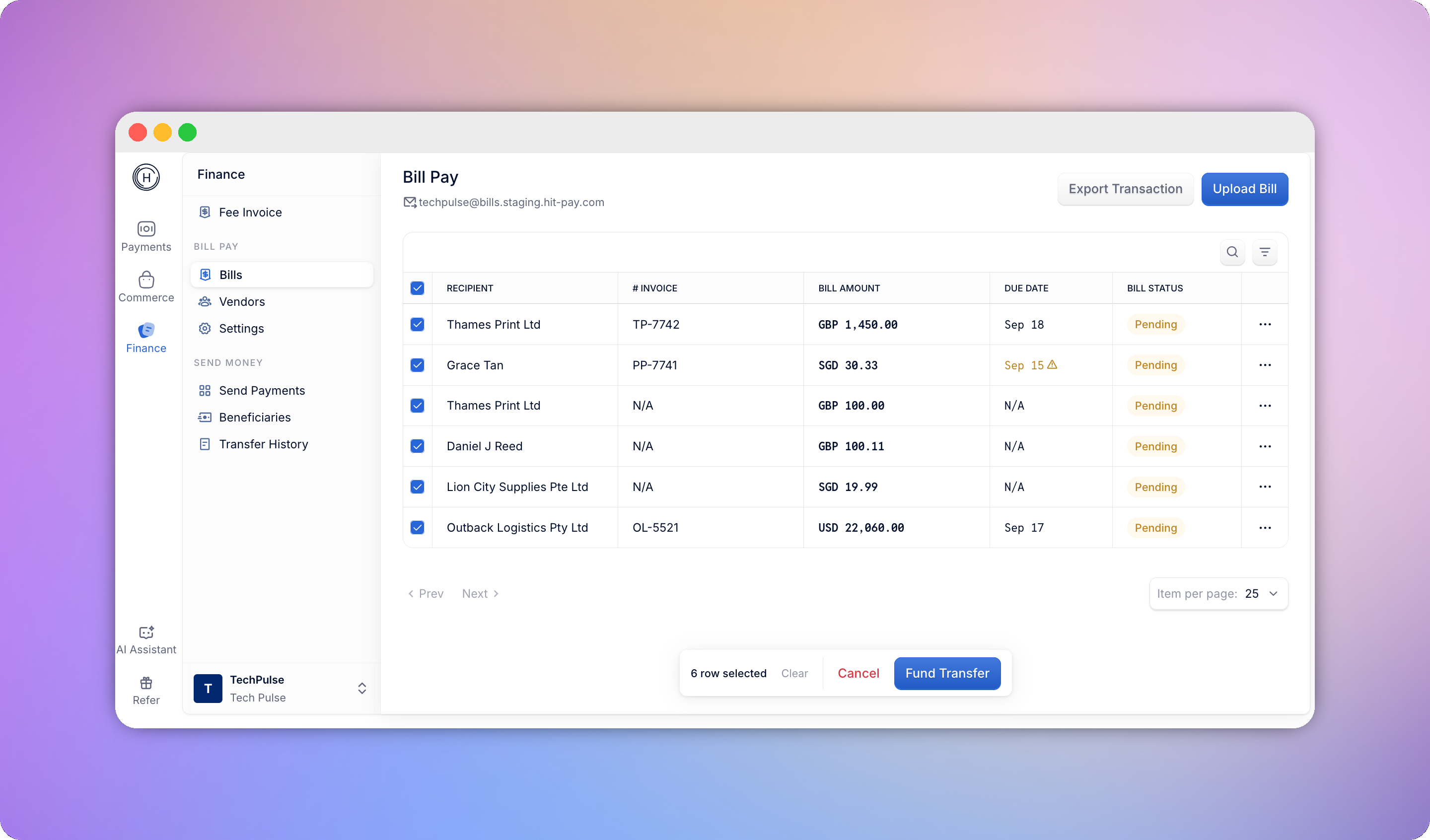
The Bill Pay dashboard has an always-visible checkbox column so you can act on several bills at once instead of repeating the same flow one bill at a time. Only **Pending**, **Need Approval**, and **Approved** bills can be selected - other statuses show a disabled checkbox, since they've already moved past the point where a batch action applies. Selecting the header checkbox selects every eligible row currently visible under the active status filter.
Batch actions apply to **up to 50 bills** at a time, and every bill in a selection must share the same status - mixing, say, a Pending bill with a Need Approval bill blocks the action until you deselect one.
 ## What you can do in bulk
| Status | Action | Who |
| ------------- | ----------------- | --------------------- |
| Pending | Send for approval | Manager, Owner, Admin |
| Pending | Cancel | Manager, Owner, Admin |
| Need Approval | Approve & Fund | Approver |
| Need Approval | Reject | Approver |
| Approved | Fund Transfer | Manager, Owner, Admin |
## Submitting or canceling in bulk
**Submit for Approval** moves every selected Pending bill straight to Need Approval - no confirmation needed, since it's non-destructive and can still be rejected. Each bill triggers its usual submission notification to approvers. If a selected bill is missing required fields (like a vendor or amount), it's skipped and stays Pending, and you'll see a summary of how many were submitted versus skipped.
**Cancel** opens a confirmation, since it's destructive - confirming soft-deletes the selected drafts. Managers can only cancel drafts they created; Owners and Admins can cancel any draft.
## Approving and funding in bulk
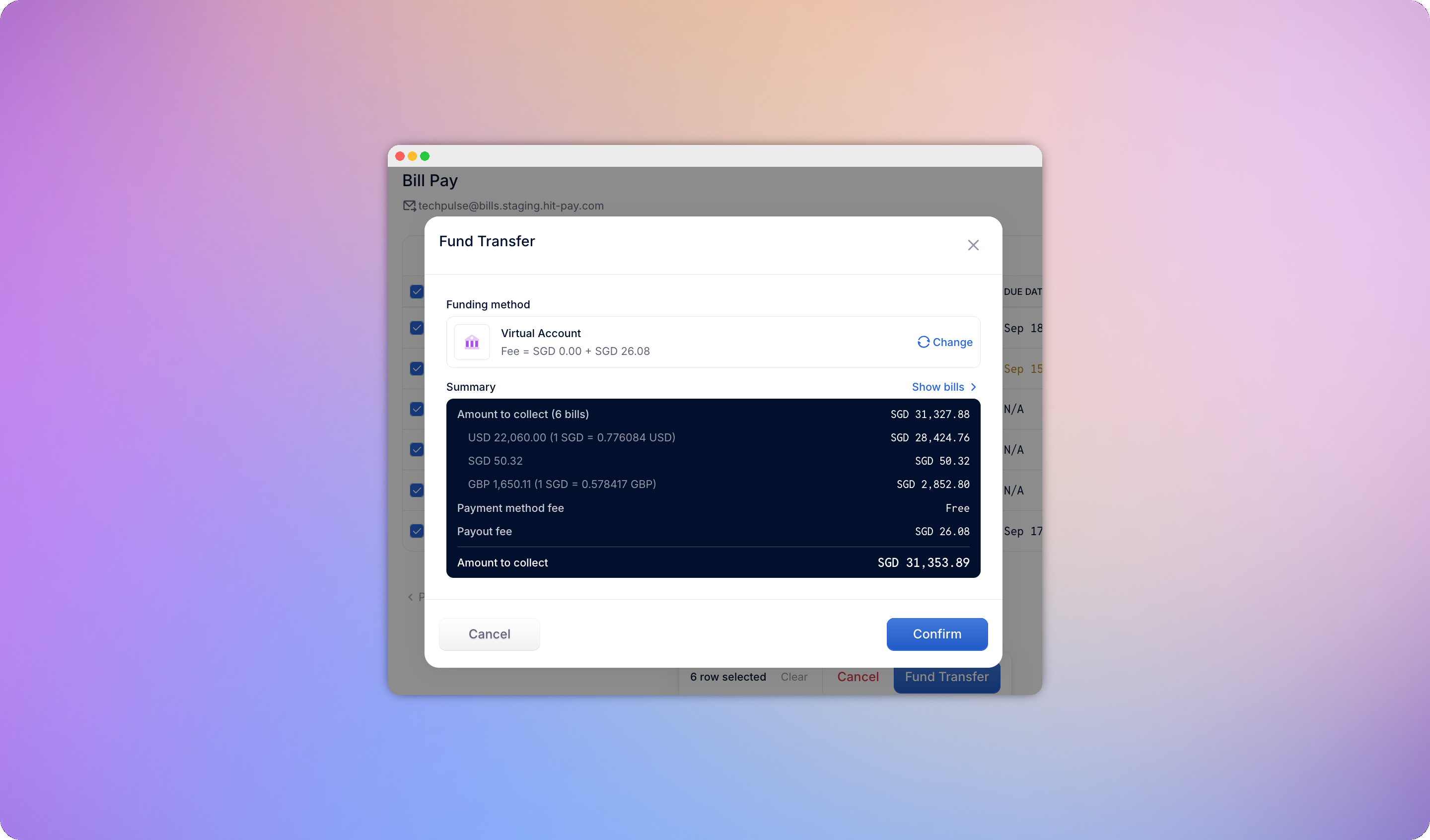
Selecting **Need Approval** bills and choosing **Approve & Fund** opens a review panel showing:
* The total across all selected bills, and a separate "to collect" total that excludes bills already funded
* A row per bill (vendor, invoice number, amount, due date) - you can open any bill to inspect it, or remove it from the batch without losing your other selections
If any bill in the batch still needs funding, you'll choose one funding method - **PayNow** or **Bank Transfer** - that applies to the whole batch. FX rates for foreign-currency bills are locked at this step, the same as a single-bill payment. If every bill is already funded, this step is skipped and the batch is approved straight away.
## What you can do in bulk
| Status | Action | Who |
| ------------- | ----------------- | --------------------- |
| Pending | Send for approval | Manager, Owner, Admin |
| Pending | Cancel | Manager, Owner, Admin |
| Need Approval | Approve & Fund | Approver |
| Need Approval | Reject | Approver |
| Approved | Fund Transfer | Manager, Owner, Admin |
## Submitting or canceling in bulk
**Submit for Approval** moves every selected Pending bill straight to Need Approval - no confirmation needed, since it's non-destructive and can still be rejected. Each bill triggers its usual submission notification to approvers. If a selected bill is missing required fields (like a vendor or amount), it's skipped and stays Pending, and you'll see a summary of how many were submitted versus skipped.
**Cancel** opens a confirmation, since it's destructive - confirming soft-deletes the selected drafts. Managers can only cancel drafts they created; Owners and Admins can cancel any draft.
## Approving and funding in bulk
Selecting **Need Approval** bills and choosing **Approve & Fund** opens a review panel showing:
* The total across all selected bills, and a separate "to collect" total that excludes bills already funded
* A row per bill (vendor, invoice number, amount, due date) - you can open any bill to inspect it, or remove it from the batch without losing your other selections
If any bill in the batch still needs funding, you'll choose one funding method - **PayNow** or **Bank Transfer** - that applies to the whole batch. FX rates for foreign-currency bills are locked at this step, the same as a single-bill payment. If every bill is already funded, this step is skipped and the batch is approved straight away.
 ## Rejecting in bulk
Rejecting a batch asks for a single reason that's applied to every bill in the selection. Each bill still transitions to **Rejected** individually, with that reason logged on its own timeline, and each submitter receives their own rejection email rather than one combined message.
## Funding in bulk
Managers, Owners, and Admins can select **Approved** bills that aren't yet funded and fund them in bulk using **Fund Transfer**, without needing to make an approval decision - useful when an Owner has approved a batch of bills and someone just needs to fund them.
## Rejecting in bulk
Rejecting a batch asks for a single reason that's applied to every bill in the selection. Each bill still transitions to **Rejected** individually, with that reason logged on its own timeline, and each submitter receives their own rejection email rather than one combined message.
## Funding in bulk
Managers, Owners, and Admins can select **Approved** bills that aren't yet funded and fund them in bulk using **Fund Transfer**, without needing to make an approval decision - useful when an Owner has approved a batch of bills and someone just needs to fund them.