

May 12, 2026 Updates
May 12, 2026 · Platform · Payments · In-Person PaymentsCustomer Detail Insights
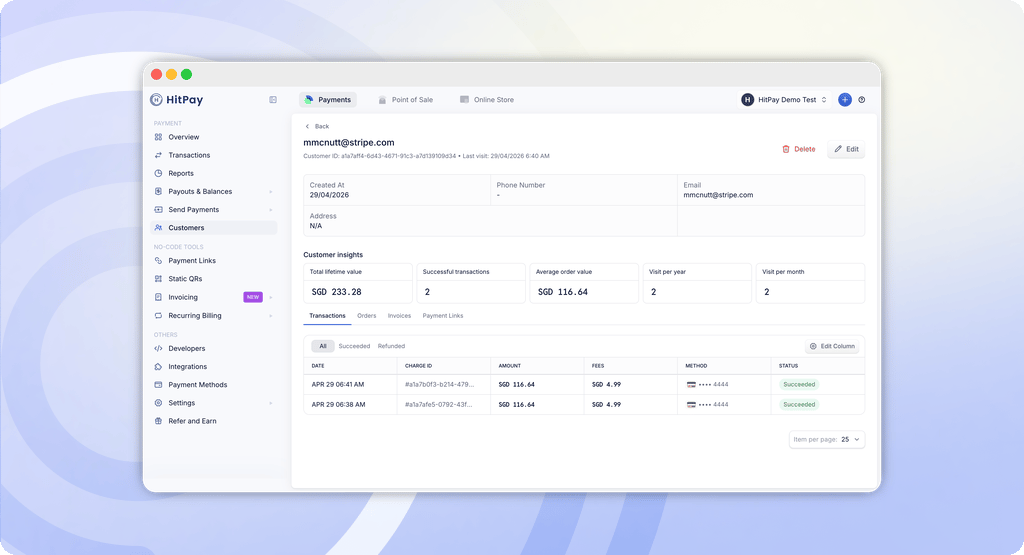
What you can see
- All activity in one view — every transaction, order, invoice, and payment link linked to this customer
- Total transactions — the cumulative value of all payments this customer has made
- Average order value — this customer’s average spend per transaction
- Visit frequency — how often this customer makes a purchase
Stripe Standard Connect Migration
Merchants outside Singapore, Malaysia, and the Philippines can now accept card payments through HitPay by connecting a Stripe Standard account — giving you direct access to Stripe’s global payments infrastructure across 40+ countries.What changes with Standard Connect
Fees: Stripe’s standard processing rates apply directly to your account. HitPay charges 0.5% per transaction on top. You’ll see HitPay’s fees in your HitPay dashboard, and Stripe’s fees in your Stripe dashboard. Your Stripe Dashboard: You get full access to your own Stripe account — view transactions, manage your balance, and configure your payout schedule directly in Stripe. Fraud and disputes: You manage fraud protection and disputes directly, and can set up your own Radar rules in Stripe to reduce risk. Merchants bear liability for fraud and disputes on direct charges. Payouts: Payouts are controlled by Stripe. Manage your balance and payout schedule directly in your Stripe Dashboard.What stays the same
You can still accept online and in-person card payments through HitPay exactly as before. All existing HitPay products, transaction history, and other payment methods are not affected.Supported countries
US, AE, AT, AU, BE, BG, CA, CH, CY, CZ, DE, DK, EE, ES, FI, FR, GB, GI, GR, HK, HR, HU, IE, IN, IT, JP, LI, LT, LU, LV, MT, MX, NL, NO, NZ, PL, PT, RO, SE, SI, SK, TH.Action required for existing users
If you currently accept card payments and are outside Singapore, Malaysia, and the Philippines, you need to complete this migration by 5 June 2026. Card payments may be interrupted if the migration is not completed before this date. How to connect your Stripe Standard account → Full migration guide →Manual Card Entry Removed from POS
Manual card entry is no longer available in the HitPay POS app. This change applies to all countries and is part of our ongoing effort to reduce fraud and chargeback risk for merchants.How to accept cards in person
You can still accept card payments in person using any of the following:- HitPay Terminal — tap, insert, or swipe using your card terminal
- Tap to Pay — accept contactless payments directly on your iPhone or Android device
- Payment Links or Scan to Pay — share a payment link or QR code for customers to pay on their own device