

Overview
The Save Payment Method API allows you to securely store a customer’s payment credentials and charge them later—on your schedule, for any amount. Unlike fixed recurring billing, this approach gives you full control over when and how much to charge.Key Concept: You’re creating a “billing session” where the customer authorizes you to save their payment method. Once saved, you can charge it anytime via API without the customer needing to re-enter their details.
Supported Payment Methods
Want to keep customers on your site? When using APMs (ShopeePay, GrabPay, Touch ‘n Go, LINE Pay, or GIRO), you can handle the payment flow directly in your UI using the deep link or setup instructions returned in the API response, no redirect to a HitPay-hosted page. This is not supported for cards. See Embedded Recurring APMs.
When to Use This
This API is ideal when you need flexibility in your billing:Variable Billing Amounts
Charge different amounts each time based on usage, consumption, or services rendered.
On-Demand Charges
Bill customers when needed rather than on a fixed schedule (e.g., marketplace payouts, top-ups).
Subscription with Flexibility
Run subscriptions where the amount may change (upgrades, add-ons, prorated charges).
Delayed First Charge
Save the payment method now but only charge when the customer’s trial ends or service begins.
How It Works
The integration follows 3 steps:1
Create a Billing Session
Call the
/v1/recurring-billing API with save_payment_method=true. You’ll receive a checkout URL to redirect the customer.2
Customer Attaches Payment Method
Redirect the customer to the checkout URL where they select their preferred payment method (card, ShopeePay, GrabPay, etc.) and authorize it.
3
Charge the Saved Method
Once attached, use the charge API to bill the customer any amount, anytime. No customer interaction required.
Step 1 – Create a Billing Session
Create a billing session by calling the/v1/recurring-billing API with save_payment_method=true. This returns a checkout URL where your customer can attach their payment method.
Endpoint
Request Parameters
Required fields:
name, customer_email, amount, and save_payment_method=trueExample Request
Response
Important: Save the
id from the response. You’ll need this to charge the customer later.Step 2 – Redirect Customer to Checkout
Redirect your customer to theurl returned in Step 1. This is a one-time setup where the customer selects and authorizes their preferred payment method.
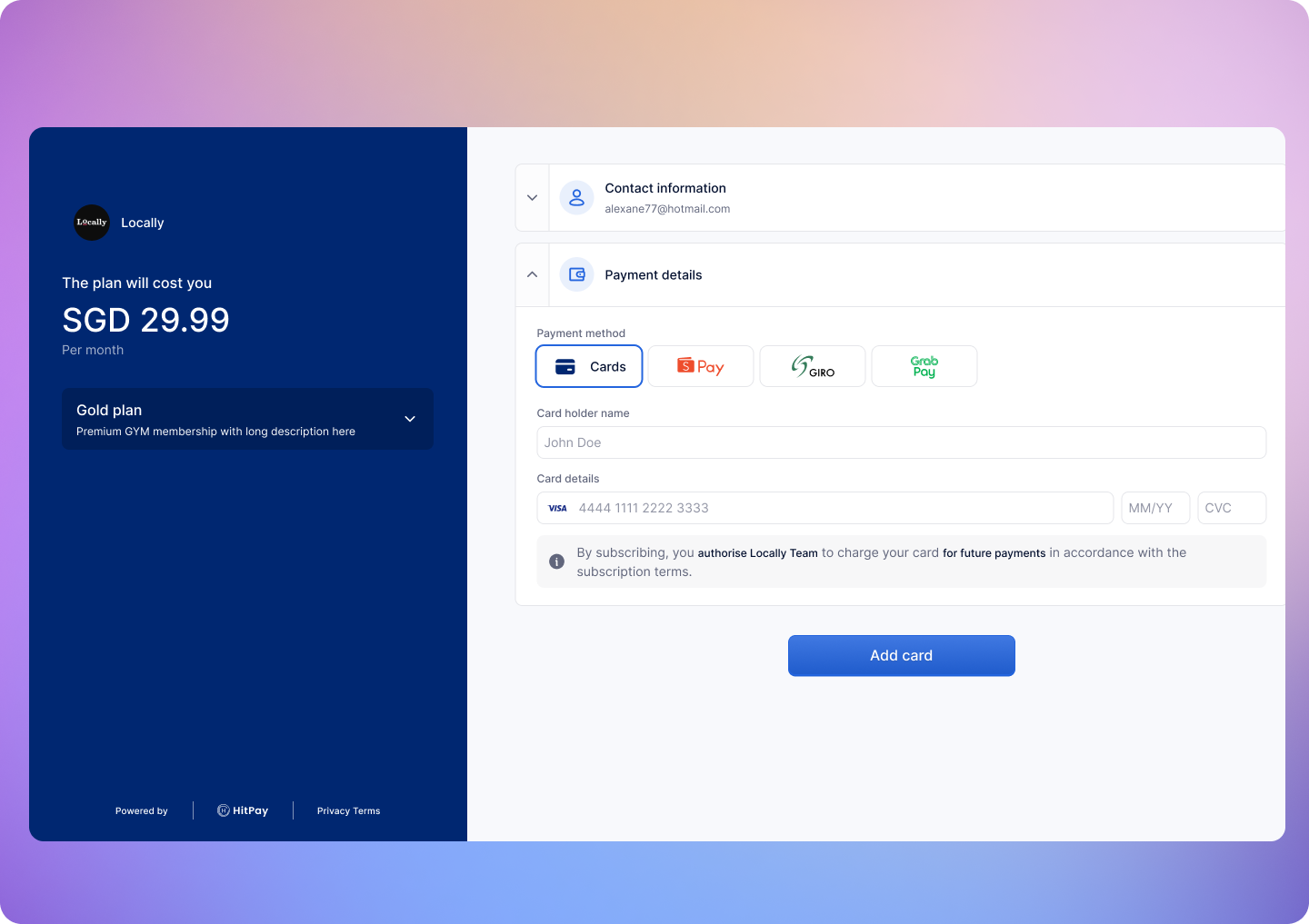
- They are redirected to your
redirect_url - Their payment method is now saved and ready to be charged
Step 3 – Charge the Saved Payment Method
After the customer has attached their payment method, you can charge them anytime by calling the charge API.Endpoint
{id} with the billing session ID from Step 1.
Request Parameters
Required fields:
amount and currencyInclude header Content-Type: application/x-www-form-urlencodedExample Request
Response
Webhooks
HitPay will send a Webhook POST request when there is a new charge or if there is an error charging the payment method.If you are using HitPay APIs to integrate into your app you must mark your order as paid ONLY after the webhook is received and validated.
Register Your Webhook
- Navigate to Developers > Webhook Endpoints in your dashboard
- Click on New Webhook
- Enter a name and your webhook URL
-
Select the events you want to receive:
charge.created— When a charge is successfully completedrecurring_billing.method_attached— When a payment method is attachedrecurring_billing.method_detached— When a payment method is detachedrecurring_billing.subscription_updated— When a billing session is updated, including status changes (active, cancelled, paused, expired)
- Save your webhook configuration
Webhook Payload
When a payment is completed, HitPay sends a JSON payload to your registered webhook URL with the following headers:Sample Webhook Payload
Validating the Webhook
To ensure the webhook is authentic, validate theHitpay-Signature header:
- Receive the JSON payload and
Hitpay-Signaturefrom the request - Use your salt value (from the dashboard) as the secret key
- Compute HMAC-SHA256 of the JSON payload using your salt
- Compare the computed signature with
Hitpay-Signature- they must match
Congrats! You’ve successfully integrated the Save Payment Method API.
FAQs
Do I need to specify an amount when saving a payment method?
Do I need to specify an amount when saving a payment method?
Yes, a minimum amount of 1 is required to initiate the save-payment-method session.
Can I modify the amount I will charge my customer later on?
Can I modify the amount I will charge my customer later on?
Yes, once your customer has attached a payment method to the
subscription, you can charge any amount using the charge the saved payment method
API.
Product Checklist
Product Checklist
Ensure the following before moving to production - Change the base URL
for all API calls to https://api.hit-pay.com/v1/ - Update API keys and
Salt values from the production dashboard
What about the 'webhook' parameter in the API?
What about the 'webhook' parameter in the API?
The
webhook parameter in the API is deprecated but still functional. We recommend registering your webhook URL in the dashboard instead for richer JSON payloads and support for multiple event types.